Overview
Overview (/admin) is the first page of the admin console. It is a status board: it tells you how the phone system is doing, what needs you, and what is happening right now, on one screen. Nothing on it changes anything by itself; every card leads to the page where you act.
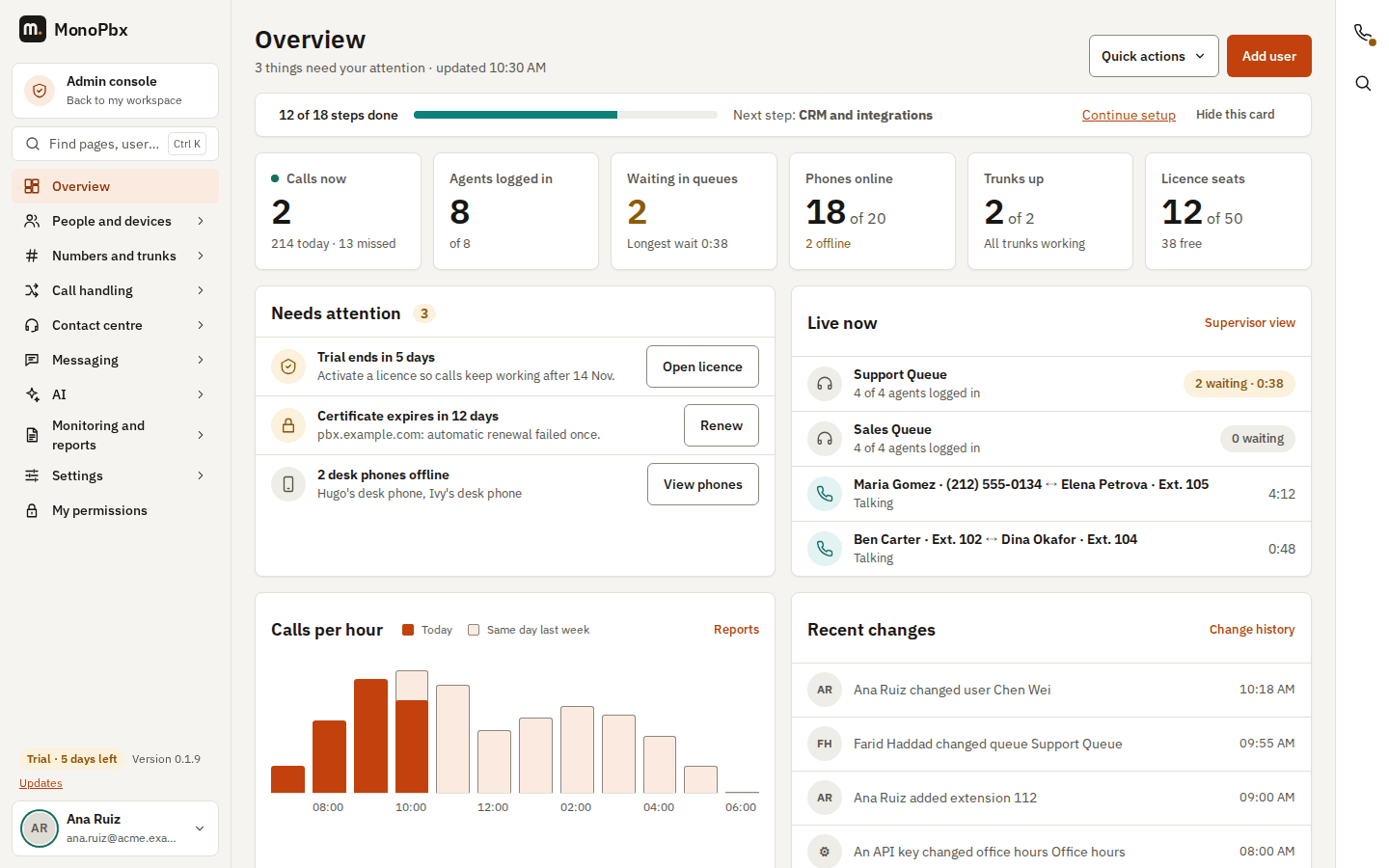
The Overview of an example company.
Each card appears only when your roles allow you to read it, so a Receptionist, a Supervisor and an Owner see different boards. A card that cannot load says so and has a Try again button; the other cards keep working.
Live tiles
The row of tiles shows the numbers that change during the day. Each tile is a link to the page behind it.
| Tile | What it shows | Needs |
|---|---|---|
| Calls now | Calls in progress, with how many calls came in today and how many of those were missed. | Controlling calls, and the call history for the "today" line |
| Agents logged in | Agents logged in to the queues you supervise, of all their agents. | Monitoring queues |
| Waiting in queues | Callers waiting in your queues now, with the longest wait. | Monitoring queues |
| Phones online | Desk phones that are registered, of all desk phones. Apps and browsers are not counted: they are offline whenever their person is away. | Reading devices |
| Trunks up | Trunks that answer the health check, and how many need attention. | Reading trunks |
| Licence seats | Users in use, of the licence limit (or "No limit"). | Reading system settings |
The tiles update every 10 to 60 seconds while the page is open and the browser tab is visible.
Needs attention
One list, worst first, of everything that needs a person: trunks that are down, certificates that are about to expire, a backup that is late, storage that is filling up or over its quota, a trial or licence that is ending, call quality that dropped, messaging channels or integrations that stopped working, alerts that are firing, and desk phones that are offline. This is the same information as Health and Alerts, in one place.
Each item says what is wrong and what it means, and has one button that opens the page where you fix it (for example Check trunk, Renew, Run backup, Free space, View phones). The list shows the five most important items and a link to Health for the rest. When nothing needs you, the card says so and shows when it last checked.
Live now
The queues you supervise, with how many agents are logged in, how many callers are waiting and for how long, and the calls in progress with the names of both people (or the number when the name is not known) and how long each has run. Supervisor view opens the full supervisor panel, where you can listen in or step in. The complete list of calls is under Monitoring and reports > Live calls.
Calls per hour
A bar for each hour of today, with the same weekday of last week as a pale bar behind it, so you can see at a glance whether today is busier or quieter than usual. Hours are in your company's time zone. Screen readers get the same numbers as a table. Reports opens the full reports.
Recent changes
The latest changes to your configuration in plain words, with who made them and when: "Ana Ruiz added extension Lobby", "An API key changed queue Support". Change history opens the full history, where you can see exactly what changed and, for most objects, undo it. The values of settings are never shown on the Overview.
Quick actions
At the top right, Add user starts a new user, and Quick actions opens a short menu: add a number, edit call handling. Each appears only if you may do it. The one-line setup bar (steps done, progress, next step) sits under the title until you have finished (or hidden) the setup guide.
On a phone
On a narrow screen the tiles show two per row, the cards stack, and each button keeps a comfortable touch size.