Using MonoPhone offline
MonoPhone keeps working when your phone loses its connection, for example in a lift, on a plane or in a basement. Every tab still shows what you saw last, and what you do while offline is sent as soon as the connection is back.
How you know you are offline
A slim strip appears under the top bar of the main screens:
| Strip says | What it means |
|---|---|
| You're offline | The phone has no network at all (no Wi-Fi, no mobile data, or flight mode). |
| Reconnecting… | The phone has a network, but your company's phone system does not answer yet. MonoPhone keeps trying on its own. |
It is the same strip that tells you about other lasting problems; while you are offline it shows only this, because no connection explains the rest. The strip never covers the tabs at the bottom or the message box. It disappears by itself when the connection is back, and the screen you are on reloads. Tap the strip to open Call readiness, which shows the network check and the other checks that decide whether calls reach this phone.
A short switch between Wi-Fi and mobile data does not show the strip.
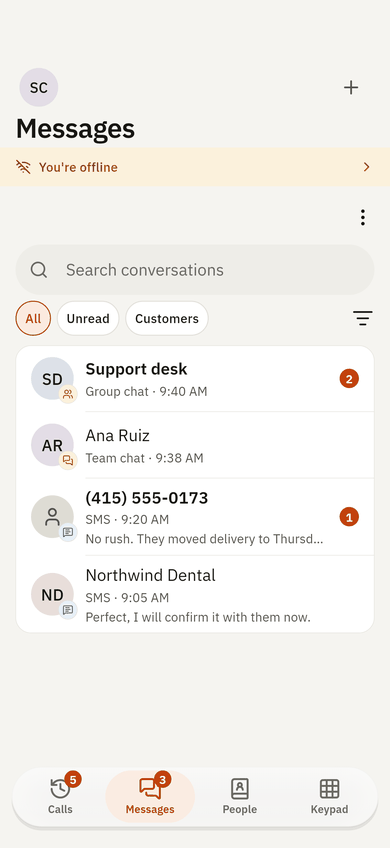
What you can see offline
Each tab shows the last data it loaded on this phone:
- Messages: team chats and their latest messages, SMS conversations and shared inbox threads.
- Calls: your call history and your voicemail list. A voicemail you played once also plays offline.
- People: your colleagues, your contacts, the phonebook and your favourites.
- Me: your profile, your statuses and your other settings pages.
- Admin and Supervisor: the lists you opened before.
Status dots of colleagues are not shown from saved data: whether someone is available can only be known online.
Saved data older than 30 days is not shown. A list you never opened on this phone shows its usual "cannot load" message with Try again.
What you can do offline
These actions wait on the phone and are sent automatically, in the order you did them, when the connection is back:
- sending a text in a team chat,
- reacting to a message or taking a reaction back,
- starring a message,
- reading a chat, an SMS conversation or a shared inbox thread (so the unread counts update),
- changing your status.
A chat message that waits shows a small clock and Waiting for connection under the bubble. When it is sent, it becomes a normal message. If your phone system refuses it (for example, you were removed from the chat meanwhile), it shows Not sent. Tap to retry.
If a colleague changed the same thing in the meantime (for example, your status was changed from the web client), the newer change on the server wins.
Some things need a connection and are not queued: sending files, photos, voice notes, locations, polls and SMS, replying in a thread, creating chats, and changes in Admin. If you try one offline, MonoPhone says No connection. Check and try again. with a Retry button.
Calls offline
Calls need an internet connection. If you dial while offline, MonoPhone says You're offline. Calls need an internet connection. and offers Call readiness. When the connection is back, the phone line registers again by itself.
Privacy and security
- The saved data is encrypted on the phone. The key is kept in the phone's secure storage (Keychain on iPhone, the Android Keystore on Android) and never leaves the phone.
- Passwords, sign-in tokens, SIP credentials and download links are never saved.
- Signing out, removing an account in Me > Accounts, or your administrator removing this device deletes that account's saved data and anything still waiting to be sent.
- Each account on the phone has its own saved data; one account never sees another's.