Backups and updates
Backups
Your cloud PBX has the same Backups page as any MonoPbx (Admin > Backups, or Backups in the card on the account page): you can take a backup at any time, schedule them and download them. See Backup and restore for what a backup contains.
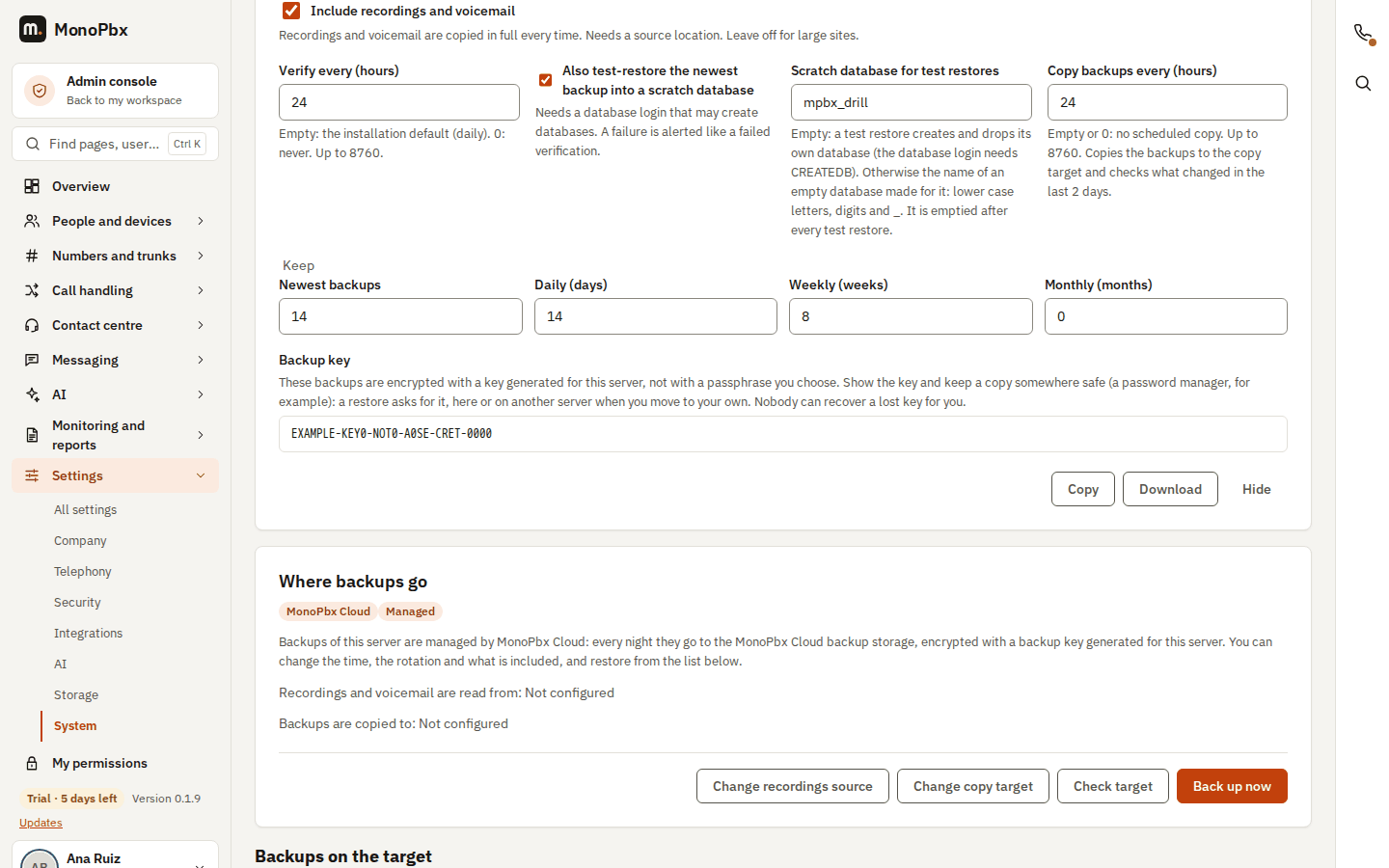
Every night your cloud PBX makes a backup to the MonoPbx Cloud backup storage in the same region, encrypted with a backup key generated for your server; each server can reach only its own backups, and only for a few minutes per file. This is set up when the server is created: on Admin > Backups the destination shows as MonoPbx Cloud with the Managed tag.
| You can | You cannot |
|---|---|
| Change the hour, the rotation and what a backup includes | Point the backups somewhere else |
| Take a backup now, verify it and restore it with the backup key | Turn the nightly backups off |
| Show the backup key, copy it and download it (see below) | Replace the backup key with a passphrase of your own |
The nightly time is inside your maintenance window (02:00 to 05:00 local time of the region), at a minute of its first hour chosen for your server, so that servers sharing the window do not all start at once; Admin > Backups shows it in UTC. If our support team changes your backup settings (for example after your maintenance window moved), your PBX picks up the new plan by itself within a few hours. By default 14 daily and 8 weekly backups are kept.
Your backup key. You do not choose a passphrase for a cloud PBX: the backups are encrypted with a key generated for your server. On Admin > Backups, select Show backup key, then Copy or Download it and keep it somewhere safe, for example in a password manager. A restore asks for this key, on your cloud PBX and on any other server, for example when you move to your own. Nobody, including us, can recover a lost key for you. Showing the key is recorded in the audit log.
A backup taken earlier with a passphrase of your own still restores: type that passphrase instead of the key.
On top of the nightly backups we keep copies of the whole server, so we can bring your PBX back if the server itself fails.
A backup is portable: it restores on a cloud PBX or on a self-hosted MonoPbx of the same or a newer version (see Cancel, or move to your own server).
Updates
A cloud PBX follows the cloud release channel and is updated automatically during its maintenance window, at night (02:00 to 05:00, local time of the region). Each update starts with a snapshot, so it can be rolled back.
You do not have to wait: an administrator can install an available update earlier from the console, or roll back the last one, as on a self-hosted MonoPbx (see Update from the console and Updates and upgrades).