Push-to-talk channels
Push-to-talk turns a group of people into a two-way radio: one person holds the talk button and everyone else in the channel hears them at once, without a call to answer. Only one person talks at a time. It suits warehouses, security teams, drivers, events and any team that needs quick, short messages more than conversations.
This page is for administrators: who can talk, how channels are set up and what the server keeps. How your users talk from the MonoPhone app (the talk button, Android's lock screen and talk keys, the Apple Watch, the desktop shortcut) is in the user guide: Push-to-talk.
How a channel works
- Members. A channel reaches either a list of people you choose, every active user of a department, every member of a team chat group, or everyone in the company (every active user who has an extension). In a department, group or everyone channel you can still add other people to the list, or give someone a different role.
- Roles. A talker hears the channel and may talk. A listener only hears it. A supervisor may talk and can take over the channel while someone else is talking (for an urgent message).
- One speaker at a time. Whoever presses talk first gets the channel (the floor). Anyone else who presses talk meanwhile is told who is talking and waits. The floor is released when the speaker lets go, or automatically after the channel's talk limit (30 seconds by default, 5 to 300 seconds).
- Waking phones. When someone starts talking, the members' phones are woken (on iPhone through Apple's push-to-talk system, on Android through a high-priority notification), so a member hears the message even when the app is in the background. A member who opens the app in the middle of a message still hears it from the start.
- Audio. The speaker's audio is sent as it is to every member; it is never mixed, transcoded or analysed.
Who can do what
| Permission | Built into | Allows |
|---|---|---|
ptt:read | Manager, Owner | See the channels, their members, the list of past transmissions, and download recordings. |
ptt:write | Manager, Owner | Create, change and delete channels. |
ptt:priority | Supervisor, Department Admin, Manager, Owner | In any channel the person belongs to: take over from a speaker, and talk even when their channel role is listener. |
Being a member of a channel is enough to listen and (for talkers) to talk; no permission is needed for that. You can add the permissions above to any custom role under Admin > Roles. Push-to-talk is for people: API keys cannot take part in a channel.
The default channel "Everyone"
Every company starts with one channel that reaches everyone: Everyone (named in the company's language when the company is created, for example Todos or Alle). Every active user with an extension is a talker in it, and people who join or leave the company join or leave the channel automatically. Its talk limit is 30 seconds and it is not recorded.
The MonoPhone app joins the default channel by itself after sign-in, so a new team can talk from day one. A user can still leave it in the app; the app remembers that and does not join it again on that device. On iPhone, which is in one channel at a time, the app joins it only when no other channel is joined.
You can change the default channel like any other: rename it, give some people the listener or supervisor role, turn recording on, switch it off with "enabled": false, or delete it. Deleting it is permanent: it is not created again, not even after an update. The API marks it with "is_default": true.
Set up a channel
Open Admin > Messaging > Push-to-talk. The page lists your company's channels with where their members come from, how many people the channel reaches (everyone in its department, chat group or company, plus the people you list) and how many of them have the channel open now, how many people are listed, whether the channel is on and whether it is recorded. A channel's own page shows the same counts. Use the search box to find a channel by name; a long list shows Show more at its end. Anyone with ptt:read sees the page; only users with ptt:write see the buttons to add, change and delete channels.
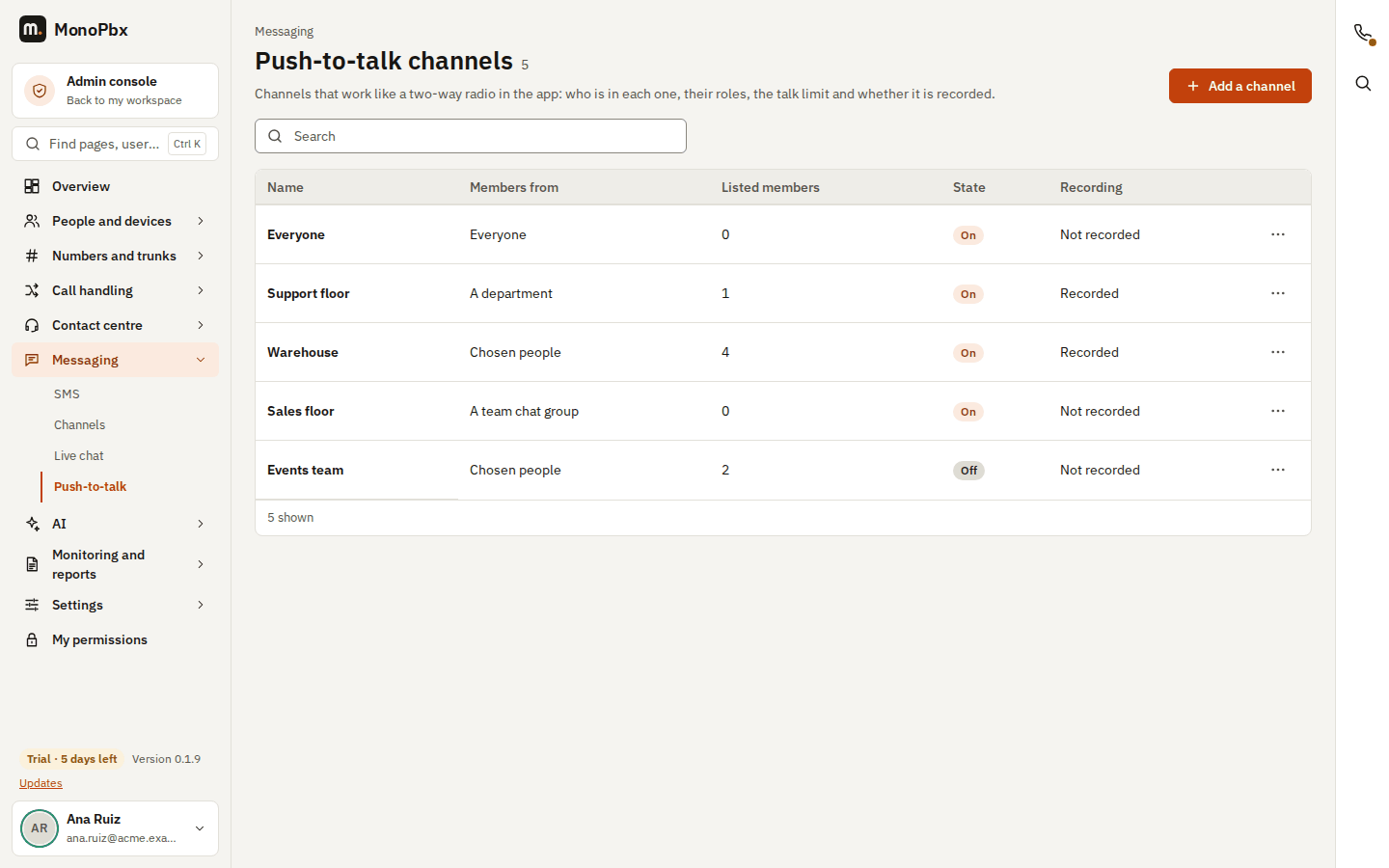
To create a channel, choose Add a channel and fill in:
- Name (unique in your company, up to 100 characters) and an optional Description that members see.
- Members from: Chosen people (only the people you list; at least one), A department (pick the department), A team chat group (pick the group) or Everyone (every active user with an extension). When someone joins or leaves the department, the chat group or the company, they join or leave the channel automatically.
- Members: pick a person and a role (talker, listener or supervisor) and choose Add a member. In a department, chat group or everyone channel, the people you list here are added to the channel or get the role you choose instead of talker.
- Talk limit (5 to 300 seconds, 30 by default), Keep history (1 to 3650 days, 30 by default), Record transmissions, and Channel on. A channel that is off stays in the members' list, but nobody can talk in it.
To change a channel, open the row's menu and choose Edit. If another administrator saved the same channel while you were editing, the page tells you and offers Reload the channel: it shows the channel as it is now, and you make your change again, so two administrators never overwrite each other. Delete asks for a confirmation first and removes the channel with its history and recordings.
With the API
Channels can also be managed through the REST API (/api/v1/ptt/channels, see the API reference) by a user with ptt:write. For example, a channel for the Operations department where one person is a supervisor and one only listens:
POST /api/v1/ptt/channels
{
  "name": "Warehouse",
  "description": "Shift leads and forklift drivers",
  "source": "department",
  "department_id": "<the department's id>",
  "max_talk_secs": 30,
  "record": false,
  "members": [
    {"user_id": "<a user's id>", "role": "supervisor"},
    {"user_id": "<another user's id>", "role": "listener"}
  ]
}
sourceismembers(only the people listed inmembers; at least one),department(withdepartment_id),chat_group(withchat_room_id, a team chat group) orcompany(everyone with an extension; no id needed).- A change (
PUT) replaces the whole channel and needs the channel'sETaginIf-Match; a stale one is refused with 412. - Switch a channel off with
"enabled": false: members keep it in their list, but nobody can talk. - Channels in the list and the channel itself carry
member_count(the people the channel reaches: its source's members and the listed people, each once) andjoined_count(how many of them have the channel open now). The members' own list (GET /api/v1/me/ptt/channels) has the same two counts. - When someone joins or leaves the department, the chat group or (for
company) the company, or gets or loses their extension, they join or leave the channel automatically.
Recording and history
Every transmission is listed with who talked, when, for how long and how it ended (released, talk limit reached, taken over by a supervisor, or connection lost). Members see the recent list of their own channels; administrators with ptt:read see every channel's list: click a channel's name on the Push-to-talk page to open its settings, its members with their roles, and its transmission history.
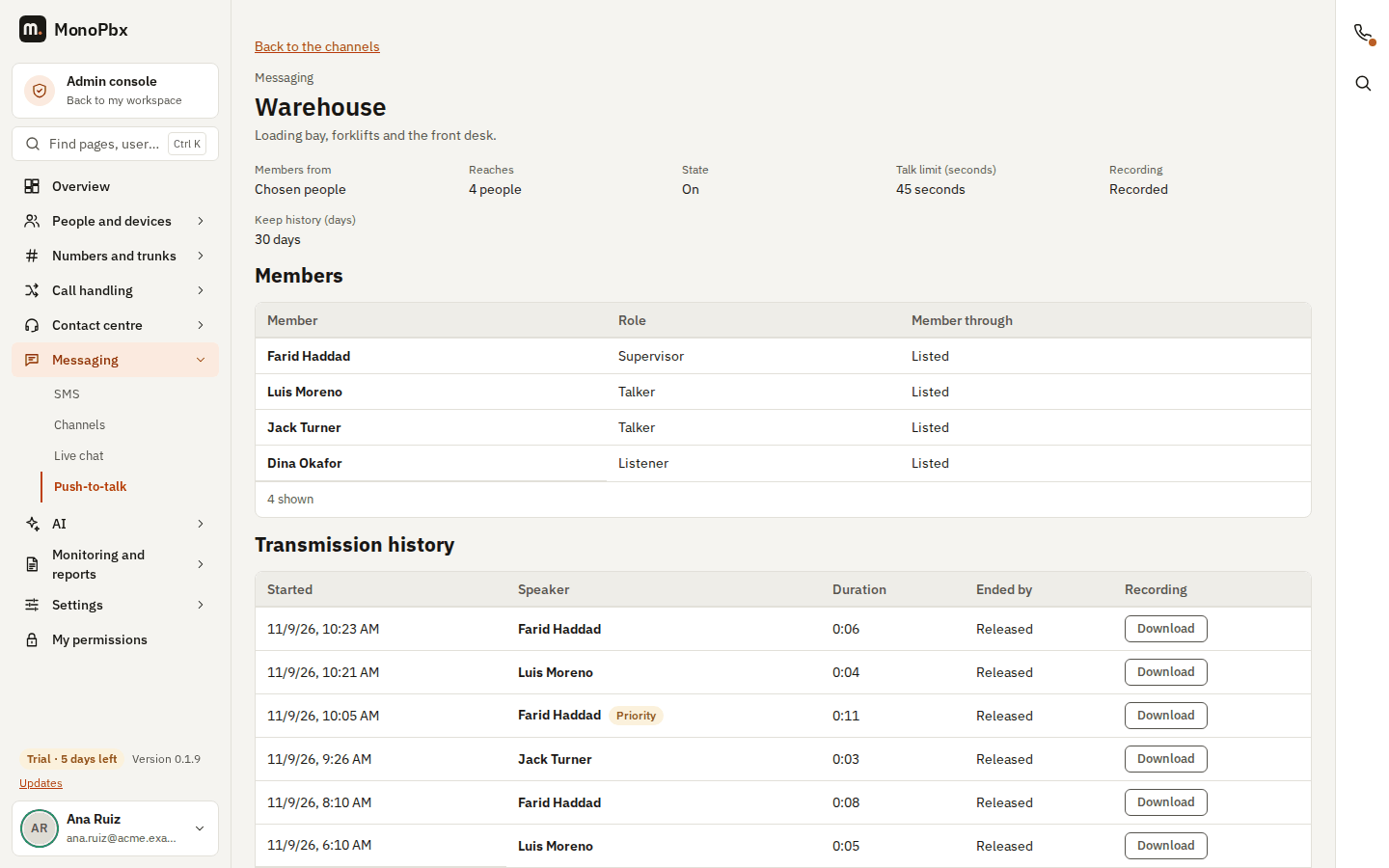
Turn on Record transmissions ("record": true in the API) to keep the audio of every transmission. Recordings are stored encrypted, like call recordings, and can be downloaded by administrators with ptt:read as Ogg Opus files (playable in most media players): choose Download next to a transmission in the channel's history. Every download is written to the audit log. Recordings need the server's file storage; without it, a recorded channel keeps the list only. Tell your members when a channel is recorded: the app shows it.
The list and the recordings are kept for the channel's Keep history days (retention_days, 30 days by default, 1 to 3650) and deleted with the channel.
What is in the audit log
Creating, changing and deleting a channel, every supervisor take-over, every stored recording and every recording download are recorded in Admin > Monitoring and reports with who did it and when.
Good to know
- Push-to-talk needs the push service of your installation to wake phones in the background. Without it, members hear a channel only while the app is open.
- A speaker's microphone is only sent while they hold the floor; nothing is sent or recorded otherwise.
- Supervisors cannot take over from another supervisor who took the floor with priority, so two supervisors never cut each other off.